

 Seonglae Cho
Object -
PHP / 함수 / empty() / 비어있는 변수인지 검사하는 함수
개요 empty로 변수가 비어있는지 검사합니다. PHP 4 이상에서 사용할 수 있습니다. 문법 empty( $var ) 1 empty( $var ) [...]

https://www.codingfactory.net/10065

API 호환성 확장 NAME 없으면 전체 리턴
- \n 같이 더해줘야함
function onlyBlurSQL($decoded){
  $sql = "SELECT w.name, bp.pvrid, bp.date, bp.date_updated
  FROM view3 AS w
  LEFT JOIN
  view1 AS bp ON bp.worker_id = w.workerid
  WHERE year(bp.date) =  2020
  AND month(bp.date) = 2\n";

  if (empty($decoded['name']))
    $sql .= "AND w.name = '". $decoded['name']."'\n";
  $sql .= "GROUP BY bp.pvrid ORDER BY bp.date_updated;";

  return $sql;
}
How Append a String in PHP
Topic: PHP / MySQL There is no specific function to append a string in PHP. But you can use the PHP concatenation assignment operator (.=) to append a string with another string. Let's check out the following example to understand how it basically works: See the tutorial on PHP operators to learn about the operators in detail.
https://www.tutorialrepublic.com/faq/how-to-append-a-string-in-php.php

.click()
Description: Bind an event handler to the "click" JavaScript event, or trigger that event on an element. A function to execute each time the event is triggered. An object containing data that will be passed to the event handler. A function to execute each time the event is triggered.
https://api.jquery.com/click/

// Map Toggle Radio Event
    $("#osmradio").click(() => { toggleMap(this, doc.getByID('OSMLayer'), "osm") })
    $("#naverradio").click(() => { toggleMap(this, doc.getByID('NaverMapLayer'), "naver") })
    $("#kakaoradio").click(() => { toggleMap(this, doc.getByID('KakaoMapLayer'), "kakao") })
    $("#googleradio").click(() => { toggleMap(this, doc.getByID('GoogleMapLayer'), "google") })
- gnss 이벤트
.change()
Description: Bind an event handler to the "change" JavaScript event, or trigger that event on an element. This method is a shortcut for .on( "change", handler ) in the first two variations, and .trigger( "change" ) in the third. The change event is sent to an element when its value changes.
https://api.jquery.com/change/

$("SelectMonth").change(() => {
						$("#BlurMonth").attr("action", "BlurMonth.php")
		        $("#BlurMonth").submit()
					})
jQuery selectbox change event(이벤트), select, value, text, size 제어
jQuery 란 모든 개체를 일관되고 다루기 쉽게 해주는 자바스크립트 라이브러리로 CSS 기반의 DOM 요소 선택기능(Selector)이 뛰어나며 이벤트, Ajax 등 많은 부분을 단순화 시켜 많은 인기가 있습니다. 이번 글에는 jQuey select box 개체에 대해 다루도록 하겠습니다. 기본적인 selectbox 형태인데요. 내부 숨겨진 code인 value 와 display되는 text 값을 한쌍으로 표현합니다. 1.
http://blog.naver.com/PostView.nhn?blogId=chsmanager&logNo=220269409239&parentCategoryNo=&categoryNo=64&viewDate=&isShowPopularPosts=false&from=postView
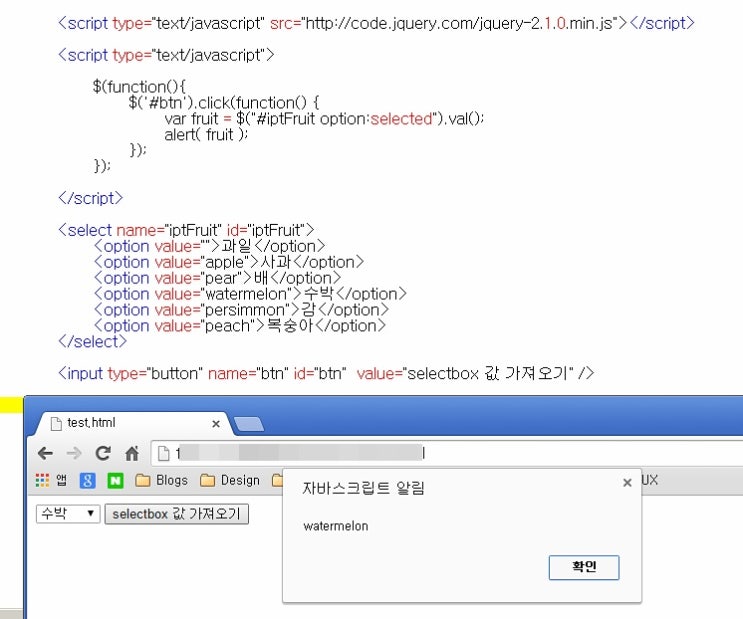
선택하면 되게
function EventBind() {
					$("#SelectMonth").change(() => {
						year = document.getElementById("SelectYear").value
						month = document.getElementById("SelectMonth").value
						$("#BlurMonth").attr("action", "BlurMonth.php")
		        $("#BlurMonth").submit()
					})
				}
[프로그래머스 SQL] 역순 정렬하기 (ORDER BY 절 - DESC, ASC)
ANIMAL_INS테이블은 동물 보호소에 들어온 동물의 정보를 담은 테이블입니다.ANIMAL_INS테이블 구조는 다음과 같으며,ANIMAL_ID,ANIMAL_TYPE,DATETIME,INTAKE_CONDITION,NAME,SEX_UPON_INTAKE는 각각 동물의 아이디, 생물 종, 보호 시작일, 보호 시작 시 상태, 이름, 성별 및 중성화 여부를 나타냅니다. 동물 보호소에 들어온 모든 동물의 이름과 보호 시작일을 조회하는 SQL문을 작성해주세요. 이때 결과는 ANIMAL_ID 역순으로 보여주세요. SQL을 실행하면 다음과 같이 출력되어야 합니다.
![[프로그래머스 SQL] 역순 정렬하기 (ORDER BY 절 - DESC, ASC)](https://t1.daumcdn.net/tistory_admin/static/top/favicon_0630.ico)
https://it-jin-developer.tistory.com/33
![[프로그래머스 SQL] 역순 정렬하기 (ORDER BY 절 - DESC, ASC)](https://t1.daumcdn.net/tistory_admin/static/images/openGraph/opengraph.png)
function inspectSQL($decoded){
  $sql = "SELECT a.name, b.pvrid, b.content, b.insertdatetimeus
    from log as b
    left join worker as a on (a.workerid = b.workerid)
    where (b.job = 400 or b.job = 1100)\n";

  if (!empty($decoded['year']))
    $sql .= "AND year(b.insertdatetimeus) = ". $decoded['year']."\n";
  if (!empty($decoded['month']))
    $sql .= "AND month(b.insertdatetimeus) = ". $decoded['month']."\n";
  if (!empty($decoded['day']))
    $sql .= "AND day(b.insertdatetimeus) = ". $decoded['day']."\n";
  if (!empty($decoded['name']))
    $sql .= "AND a.name = '". $decoded['name']."'\n";
  $sql .= "GROUP BY b.pvrid,b.insertdatetimeus ORDER BY b.insertdatetimeus;";

  return $sql;
}
무쳐버린 코딩실력
function apiMain(){
  // API DIVISION
  switch ($_SERVER['REQUEST_METHOD']){
    case 'POST':
    $contentType = isset($_SERVER["CONTENT_TYPE"]) ? trim($_SERVER["CONTENT_TYPE"]) : '';
    if ($contentType === "application/json") {
        $content = trim(file_get_contents("php://input"));
        $decoded = json_decode($content, true);
        switch($decoded['flag']){
          case 'inspect':
            $sql = inspectSQL($decoded);
            break;
          case 'blur':
            $sql = blurSQL($decoded);
        }
        $dbData = getTable($sql);
        echo json_encode($dbData);
    }
    break;
  }
}