


Right click VSCode project
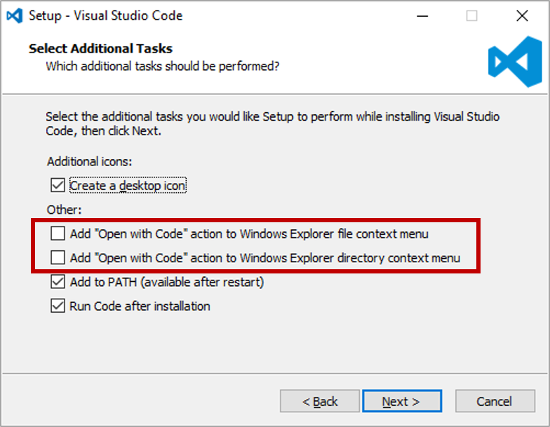
Right click on Windows folder and open with Visual Studio Code | thisDaveJ
I'm all about using Visual Studio Code for Node.js development. It is a lightweight code editor and runs on Windows, Mac OS X, and Linux. I enjoy it so much that I also use it for Node.js projects on the Raspberry Pi.

https://thisdavej.com/right-click-on-windows-folder-and-open-with-visual-studio-code/
Windows Registry Editor Version 5.00
; Open files
[HKEY_CLASSES_ROOT\*\shell\Open with VS Code]
@="Edit with VS Code"
"Icon"="\"C:\\Home\\Image\\Icon\\Material\\doc - texts.ico\",0"
[HKEY_CLASSES_ROOT\*\shell\Open with VS Code\command]
@="\"C:\\Users\\seongLae\\AppData\\Local\\Programs\\Microsoft VS Code\\Code.exe\" \"%1\""
; This will make it appear when you right click ON a folder
; The "Icon" line can be removed if you don't want the icon to appear
[HKEY_CLASSES_ROOT\Directory\shell\vscode]
@="Open Folder as VS Code Project"
"Icon"="\"C:\\Home\\Image\\Icon\\Material\\windows.ico\",0"
[HKEY_CLASSES_ROOT\Directory\shell\vscode\command]
@="\"C:\\Users\\seongLae\\AppData\\Local\\Programs\\Microsoft VS Code\\Code.exe\" \"%1\""
; This will make it appear when you right click INSIDE a folder
; The "Icon" line can be removed if you don't want the icon to appear
[HKEY_CLASSES_ROOT\Directory\Background\shell\vscode]
@="Open Folder as VS Code Project"
"Icon"="\"C:\\usr\\ico\\disk.ico\",0"
[HKEY_CLASSES_ROOT\Directory\Background\shell\vscode\command]
@="\"C:\\Users\\seongLae\\AppData\\Local\\Programs\\Microsoft VS Code\\Code.exe\" \"%V\""
registry file language but javaScript for color