install module
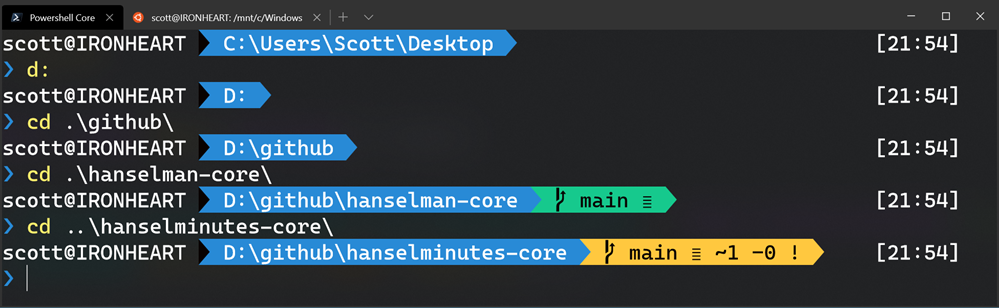
How to make a pretty prompt in Windows Terminal with Powerline, Nerd Fonts, Cascadia Code, WSL, and oh-my-posh
I've blogged about Patching the new Cascadia Code to include Powerline Glyphs and other Nerd Fonts for the Windows Terminal but folks have asked very specifically, how do I make my prompt look like that? Get Windows Terminal free from the Store.
https://www.hanselman.com/blog/how-to-make-a-pretty-prompt-in-windows-terminal-with-powerline-nerd-fonts-cascadia-code-wsl-and-ohmyposh

윈도우 터미널(PowerShell) zsh 스타일 적용
1. 관리자 권한으로 PowerShell 실행 2. 이하 명령어 실행(Y 입력) Install-Module posh-git -Scope CurrentUser Install-Module oh-my-posh -Scope CurrentUser 3. 이하 명령어로 PowerShell에서 스크립트 허용시키기 Set-ExecutionPolicy Unrestricted 4. 스크립트 허용이 적용됬는지 확인 ExecutionPolicy // 응답 : Unrestricted 5. 노트패드로 기본 프로파일 열기 notepad $PROFILE 6.
https://comocloud.tistory.com/203
Windows Terminal - PowerShell customization via oh-my-posh/posh-git Set-Theme error? · Issue #9237 · microsoft/terminal
Windows Terminal - PowerShell customization via oh-my-posh/posh-git Set-Theme error? I follow the exact tutorial of Microsoft link: Link Here video link: Video Link Here I have installed Posh-Git and Oh-My-Posh: via this code - Install-M...
https://github.com/microsoft/terminal/issues/9237

Seonglae Cho